Smart AI vs Simple AI
- junlachaktophat
- Jul 15, 2025
- 2 min read

Updated: Mar 29
Smart AI vs Simple AI: A Unity Machine Learning Comparison
Full Project Documentation (Google Docs): Click Here
Github: Click Here
Project Overview
In this project, I explored the capabilities of Machine Learning (ML) in game development by comparing a simple AI (NavMesh) to a learning-based AI agent trained using Unity ML-Agents.
The goal is to let the Smart AI (ML-Agent) survive and adapt, while the Simple AI (NavMesh Agent) pursues the agent using fixed logic. Via multiple training phases and environment iterations, I evaluated how AI can evolve, adapt, and outperform scripted behaviors.
Core Systems Overview
NavMesh AI
This project uses NavMesh AI, a proprietary AI technology developed by Unity. Its operational structure is simply to locate players (pathfinding) and eliminate them, similar to zombies. The goal of this AI is for ML-Agents to learn how to eliminate enemies, creating a more intelligent AI capable of eliminating all enemies and completing tasks (collecting items).
ML-Agent
In developing Smart AI, I used Machine Learning to create an ML-Agent, which is a self-learning AI. For the AI to know the enemy's location, it needs a RayPerceptionSensorComponent3D, a 3D sensor, to recognize enemies from the left, right, and above. To make the AI remember that its actions are correct, a reward-based system is required.
Reward-based
This system helps ML-Agents remember correct and incorrect actions. Basically, if the Agent does the right thing, such as dodging enemies, collecting items, and eliminating enemies, the player will get points according to the program's predetermined target. The program sets the maximum target for collecting items. If you want to change the target, you'll need to modify the code.
Three Phases of Training
Phase 1
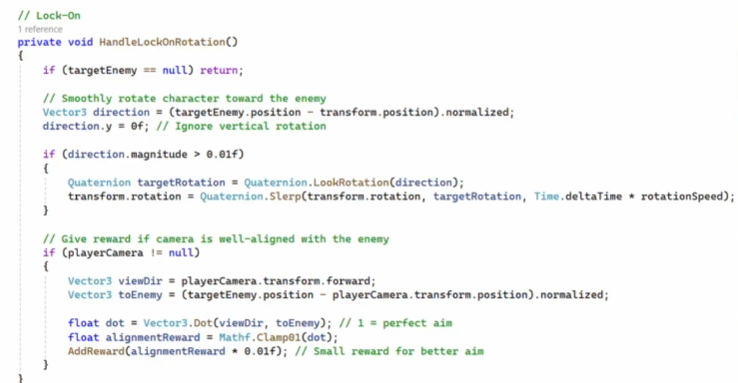
In the first phase, the only enemy would be the NavMesh AI, along with ML-Agents that learn how to eliminate and evade enemies. A Target Lock System script would help the ML-Agents detect and eliminate enemies, but this did not allow the agents to learn as much as they should.
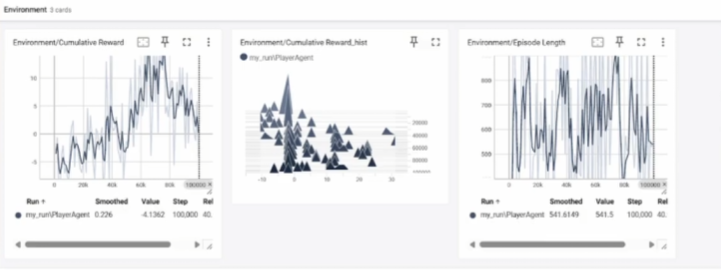
Analysis on TensorBoard shows fluctuating values, indicating that the agent did not know what to do and had not learned sufficiently. It knew how to eliminate enemies, but did not evade them.
Phase 2
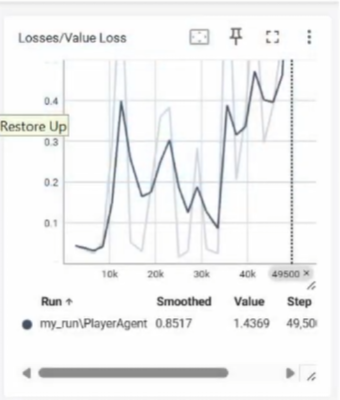
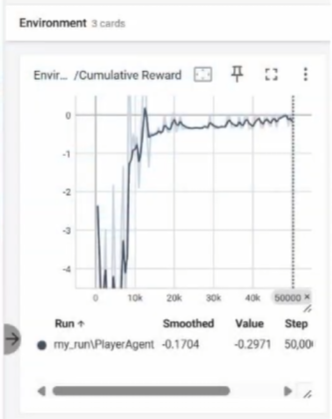
In phase 2, Collectibles were added to the Agent so that it could learn to aim at enemies and collect collectibles simultaneously. However, enemy aiming is based on fixed logic, so the Agent has not learned it on its own yet. On the TensorBoard graph, the reward graph is starting to stabilize, indicating that the Agent is learning to perform better. However, the loss graph is unstable, showing that the Agent is following the instructions but not improving based on the given logic.
Phase 3
In the final phase, the Target Lock System script was disabled, and ray perception was used to allow the agent to locate enemies, rotate the camera, and fire automatically. Collecting Collectibles was set as the ultimate goal. On the TensorBoard graph, the loss graph remained stable, indicating the AI's learning process.

Tools Used:
Unity 2023.2+
ML-Agents Toolkit (v0.28+)
TensorBoard (for monitoring training progress).
Anaconda (for running training scripts).
Github
Github Desktop
Full Project Documentation (Google Docs): Click Here
Github: Click Here
Comments